# Creating a wholesome chat space with Tensorflow
Along with the growing accessibility of the internet across the world, offensive actions across the virtual space have also become increasingly prevalent. According to [Pew Research](https://www.pewresearch.org/internet/2021/01/13/the-state-of-online-harassment/), roughly 4 in 10 Americans have experienced online harrassment. Through machine learning, we can help to improve user experience to avoid negative interactions.
## Using machine learning models
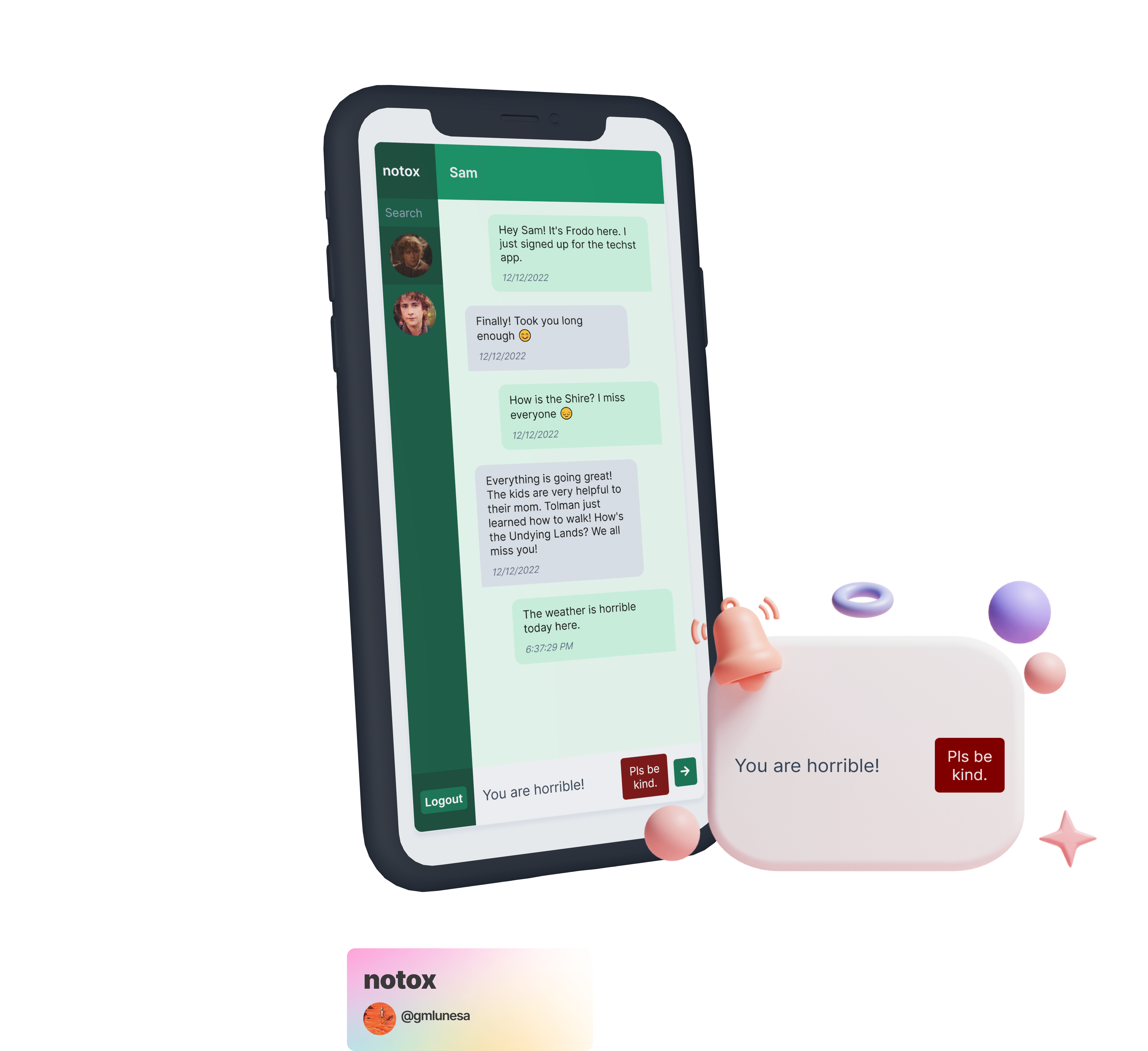
In this blog post, I will provide a walkthrough on how to integrate and use a machine learning model in a chat application to prevent rude messages from being sent. Of course, there is a simple option to identify toxic messages by checking if the message contains a word that is deemed inappropriate. However, this approach may overlook semantic context and may misclassify the message. Take these two sentences for example:
- The weather is **horrible**.
- You are **horrible**.
If the word horrible was in the list of inappropriate words, the first sentence will be misclassified as toxic. Context _matters_, hence we will harness the power of machine learning to take this a step further.
This project will be using a pre-trained TensorFlow model from [Tensorflow.js](https://www.tensorflow.org/js). The model detects whether the text contains toxic content such as threatening language, insults, obscenities, identity-based hate, or explicit language. It is built on top of the Universal Sentence Encoder ([Cer et al., 2018](https://arxiv.org/pdf/1803.11175.pdf)), a model that encodes text into 512-dimensional embedding and uses the Transformer ([Vaswani et al, 2017](https://arxiv.org/pdf/1706.03762.pdf)) architecture, which is a state-of-the-art method for modelling language.
The model will then be integrated to a React chat application that is bootstrapped with [Techst](https://github.com/gmlunesa/techst/), a plug and play chat platform template.
## Chat platform setup
- Clone the Techst repository (alternative: [Create a repository from a template - GitHub Docs](https://docs.github.com/en/repositories/creating-and-managing-repositories/creating-a-repository-from-a-template))
```bash
git clone https://github.com/gmlunesa/techst.git
```
- Install Node modules
```bash
npm install
```
- Go to the [Firebase Console](https://console.firebase.google.com).
- Add a project.
- Add `Authentication` with `Email/Password` as the `Sign-in method`.
- Add a `Firestore Database`.
- Add a `Storage`.
- Add a `Web` application.
- Copy the Firebase configuration that has been generated.
- Open the `firebase.sample.js` file, paste and replace the Firebase configuration under the `// TODO: Replace` comment.
```js
// TODO: Replace
apiKey: 'YOUR_API_KEY',
authDomain: 'YOUR_AUTH_DOMAIN',
projectId: 'YOUR_PROJECT_ID',
storageBucket: 'YOUR_STORAGE_BUCKET',
messagingSenderId: 'YOUR_MESSAGING_SENDER_ID',
appId: 'YOUR_APP_ID',
```
- Rename the `firebase.sample.js` file to `firebase.js`.
## Tensorflow Integration
Now that the chat application is up and running, we can now incorporate Tensorflow in our app.
- Install relevant Tensorflow packages
```bash
npm install @tensorflow/tfjs @tensorflow-models/toxicity
```
- Open `src/components/Input.js`
- Import the load method from the Toxicity model.
```js
// Input.js
import { load } from "@tensorflow-models/toxicity";
```
- Inside the functional component, add the following states.
```js
// Input.js
const [isToxic, setIsToxic] = useState(false);
const [isClassifying, setIsClassifying] = useState(false);
const [hasLoaded, setHasLoaded] = useState(false);
```
- `isToxic`: variable to contain the toxicity assessment from model
- `isClassifying`: variable to keep track of the classification process
- `hasLoaded`: variable to keep track whether the model has loaded
- Inside the functional component, insert the useRef hook.
```js
// Input.js
const model = useRef(null);
```
- `model`: retain the Tensorflow model that will persist for the full lifetime of the Input component
- Inside the functional component, insert the useEffect hook.
```js
// Input.js
useEffect(() => {
async function loadModel() {
const threshold = 0.9;
model.current = await load(threshold);
setHasLoaded(true);
}
loadModel();
}, []);
```
- Inside the useEffect hook, we load the model through the `load` method from Tensorflow, which accepts an optional parameter `threshold`. Its default value is `0.85`, but we will tweak it to `0.9`.
- The `load` method also loads the topology and weights, and returns a Promise which is resolved with the model.
> **Topology**: a file describing the architecture of a model (what operations it uses) and containing references to the model's weights which are stored externally.
>
> **Weights**: binary files containing the model's weights, usually stored in the same directory as topology.
>
> Source: [Tensorflow](https://www.tensorflow.org/js/guide/save_load)
- Inside the functional component, add the following code at the top of the `handleSend` method.
```js
// Input.js
// Set state variables
setIsSending(true);
setIsClassifying(true);
const predictions = await model.current.classify([text]);
setIsClassifying(false);
const toxicityResult = predictions[6].results[0].match;
// Set the state variable with the final prediction result
setIsToxic(toxicityResult);
if (!toxicityResult) {
// Move the message sending code here
}
```
- The `classify` method takes a parameter of a string array to be evaluated to predict the toxicity. It returns a Promise that is resolved with a `predictions` array.
- The `predictions` array is an array of objects containing the probabilities for each label. A label is what the TensorFlow model can provide predictions for: `identity_attack`, `insult`, `obscene`, `severe_toxicity`, `sexual_explicit`, `threat`, and `toxicity`. For each toxicity label, there is an array of raw probabilities for each input sentence along with the final prediction. The final prediction can be any of the following:
- `true` if the probability of a match exceeds the confidence threshold,
- `false` if the probability of _not_ a match exceeds the confidence threshold, and
- `null` if neither probability exceeds the threshold.
- We will be getting the final prediction value from the `toxicity` label, which is the seventh item in the array, hence `predictions[6].results[0].match`.
- We are done with incorporating the TensorFlow model in our code! The next step would be to use the prediction result to show a reminder or not.
```jsx
// Input.js
{
isToxic && Pls be kind.;
}
```
That is it! If a user attempts to send a toxic message, it will filtered out by the machine learning model and will not be sent. A more positive space has now been created 🌱.
## Next steps
While this is an exciting project, running the model and its classification process in the browser's main thread might pose some blockages in the application. I will be looking into the [Web Workers API - Web APIs | MDN](https://developer.mozilla.org/en-US/docs/Web/API/Web_Workers_API) to separate the model's processing logic.
Here are some useful links that you may want to check out:
- [Notox Source Code](https://github.com/gmlunesa/notox)
- [Techst](https://github.com/gmlunesa/techst/)
- [TensorFlowJS](https://www.tensorflow.org/js)